
There is a moment that most Salesforce teams know well. Someone makes a configuration change directly in the Salesforce production org. While it may seem small while doing it and may even be intended to improve efficiency, it can quickly lead to serious issues when the updated version stops producing the required output.
The post-mortem reveals that the change conflicted with an existing automation nobody remembered was there. As a result, customer records were updated incorrectly. The account executive who was mid-call with a prospect had to apologize and call back.
This is exactly what Salesforce sandbox management is designed to prevent. It is a practical system that ensures every change made to a Salesforce org is built, tested, and validated in a safe environment before it reaches the live system that your customers and internal teams depend on every day.
If this is your first time hearing the term, this article starts at the beginning. If you already know what Salesforce sandboxes are, but your team’s process feels closer to chaos than a reliable system, there is plenty here for you too.
What a Salesforce Sandbox Actually Is
A Salesforce sandbox is a separate copy of your production Salesforce environment. In simple terms, it is a private and isolated environment where your team can build, test, and validate changes without affecting real customer data or live business operations.
When you make a change in a sandbox, nothing impacts production until the update is deliberately moved there through a controlled Salesforce deployment process.
For organizations managing frequent updates, integrations, or automation changes, sandbox environments are a critical part of Salesforce DevOps, release management, and risk reduction.
The Four Types of Salesforce Sandbox
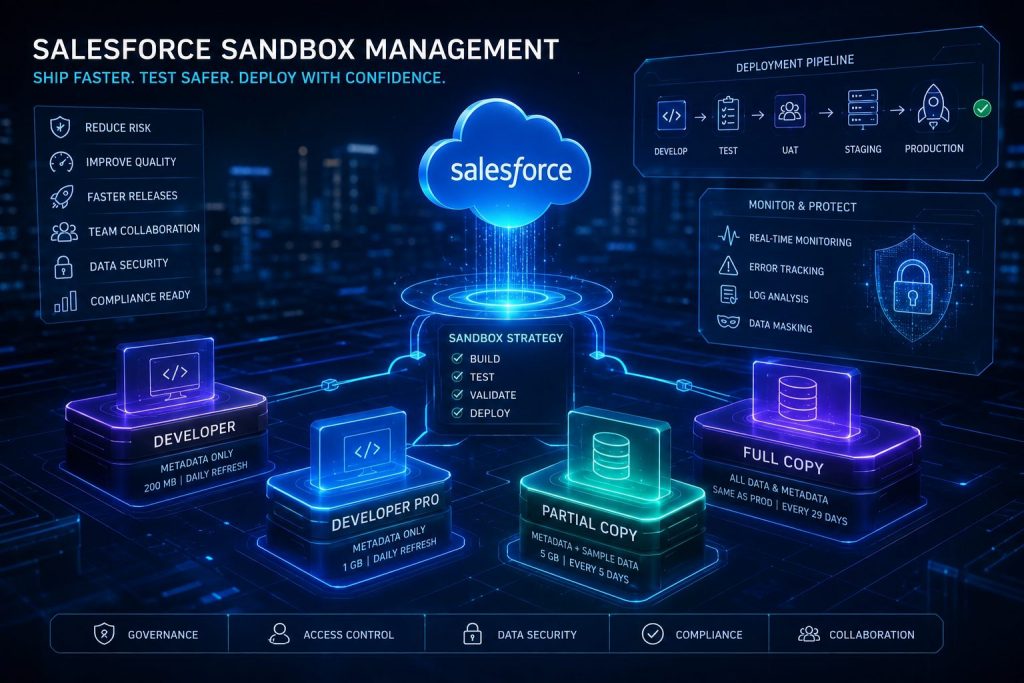
Salesforce provides four different types of sandboxes. They differ in how much production data they copy, how much storage they include, and how often they can be refreshed. Choosing the right sandbox type is one of the most important decisions in creating an effective Salesforce environment management strategy.
| Sandbox Type | What It Copies | Storage | Refresh Interval | Best Used For |
|---|---|---|---|---|
| Developer | Metadata only (no production data) | 200 MB | Daily | Individual feature builds, quick configuration experiments, Apex development, prototyping |
| Developer Pro | Metadata only (no production data) | 1 GB | Daily | Larger codebases, multi-developer feature builds, and early integration testing |
| Partial Copy | Metadata + sample data (up to 10,000 records per object defined by a template) | 5 GB | Every 5 days | User acceptance testing (UAT), integration testing, and training with realistic data |
| Full Copy | Complete copy of production — all metadata and all data | Same as production | Every 29 days | Final pre-release regression testing, load testing, compliance audits, and production rehearsals |
It is worth noting that Full Copy sandboxes are the most powerful and also the most expensive, both in licensing costs and refresh time. Because they contain real production data, they also create significant Salesforce data security and compliance responsibilities.
You do not want sensitive customer information sitting in a sandbox where developers or external users can access it without proper controls.
Most mid-sized organizations need at minimum:
- One Developer sandbox for each active developer or admin
- One Partial Copy sandbox for UAT
- One Full Copy sandbox for final release testing
That is the baseline. Everything else depends on how well those environments are managed.
Common Salesforce Sandbox Mistakes That Cause Problems
The most common sandbox problem is the absence of a clear policy about who uses which environment.
Without that policy, teams often end up sharing one or two Developer sandboxes. One developer is building a feature, another is testing a bug fix, and a third is experimenting with a new Salesforce Flow. All three are making changes to the same objects and fields simultaneously.
This creates conflicts, broken configurations, and deployment confusion.
1. Shared Sandbox Chaos
When multiple people work in the same sandbox without governance, it becomes impossible to track what changed and why. This is one of the biggest causes of failed Salesforce deployments.
2. Hardcoded Values in Salesforce Development
Another common issue is hardcoded values.
Developers sometimes place specific email addresses, record IDs, API endpoints, or usernames directly inside Apex code, Flows, or automation logic. These values often exist only in one environment.
When the sandbox is refreshed or the deployment moves to another org, those hardcoded references break.
The recommended best practice is to use:
- Custom Metadata Types
- Custom Settings
- Named Credentials
- Environment variables
This improves portability and reduces deployment failures.
3. Skipping Testing Environments
Some teams build in a Developer sandbox, decide everything looks fine, and deploy directly to production.
This shortcut usually becomes expensive later.
A change that works perfectly in isolation may conflict with existing automation, integrations, validation rules, or large production data volumes.
A structured Salesforce release management process prevents these issues.
What a Proper Salesforce Sandbox Strategy Looks Like
A Salesforce sandbox strategy is a documented framework that defines:
- Which environments your team uses
- What each sandbox is intended for
- Who has access
- How changes move between environments
- How releases are tested and approved
Below are the essential best practices every Salesforce team should follow.
1. Define Your Salesforce Environment Structure Before Any Project Begins
Before starting major Salesforce implementation or customization work, define the environment path clearly.
A typical structure for a mid-sized Salesforce team looks like this:
- Developer Sandbox — Individual development and unit testing
- Developer Pro Sandbox — Combined integration testing between team members
- Partial Copy / UAT Sandbox — Business user testing with realistic data
- Full Copy / Staging Sandbox — Final regression testing against production-scale data
- Production Org — Live deployment after all approvals
This structure creates consistency and reduces deployment risk.
2. Give Every Sandbox a Name, Owner, and Purpose
Name sandboxes clearly based on their business function:
- Feature-CPQ
- UAT-Spring26
- Integration-ERP
Every sandbox should also have:
- A designated owner
- A documented purpose
- A refresh schedule
- Access control rules
Document this information in a shared workspace such as Confluence, Jira, Notion, or a project tracker.
This may sound administrative, but it directly improves deployment confidence and operational visibility.
3. Manage Sandbox Refresh Cycles Deliberately
A sandbox that has not been refreshed in several months is no longer testing against the current production reality.
That means:
- New automations may be missing
- Validation rules may differ
- Integrations may be outdated
- Configuration conflicts may go unnoticed
Developer sandboxes can refresh daily, while Partial Copy and Full Copy environments have longer refresh intervals.
Always communicate planned refreshes at least 48 hours in advance. A refresh deletes any uncommitted work currently inside the sandbox.
Teams need time to either deploy their changes or postpone the refresh.
4. Treat Sandbox Data as a Compliance Responsibility
If your sandbox contains production data, then it falls under the same privacy and compliance regulations as your live Salesforce org.
This includes:
- GDPR
- CCPA
- HIPAA
- Industry-specific compliance standards
A common solution is Salesforce data masking.
Data masking replaces sensitive information with fictitious but realistic values while preserving data relationships and structure for testing.
Salesforce provides native Data Mask capabilities, and many organizations also use third-party DevOps tools for secure sandbox management.
Organizations that ignore sandbox data security expose themselves to unnecessary regulatory and operational risk.
When Salesforce Deployments Go Wrong Anyway
Even with a strong sandbox strategy, issues can still appear in production.
An automation that worked perfectly in UAT may behave differently under production-scale data volumes. An integration may fail because production API credentials differ from staging.
The two practices that reduce long-term damage are:
Pre-Deployment Backups
Before major deployments, create a point-in-time backup of Salesforce metadata and configurations.
Tools like:
- Gearset
- Copado
allow teams to roll back safely if needed.
Post-Deployment Monitoring
The first 24 hours after deployment are critical.
Monitor:
- Automation logs
- Apex errors
- Integration queues
- Failed Flows
- API activity
Most severe deployment incidents happen because teams fail to detect problems early enough.
How Sarla Consulting Helps With Salesforce Sandbox Management
Sandbox management, Salesforce release management, and DevOps process design are core parts of Sarla Consulting’s Managed Services and Salesforce implementation offerings.
We work with organizations at every stage of Salesforce maturity.
For new clients, we begin by evaluating:
- Their current release process
- Existing sandbox structure
- Deployment risks
- Governance gaps
- Team workflows
From there, we help design a scalable Salesforce sandbox strategy aligned with the organization’s technical requirements and business goals.
Some organizations want to build internal capability over time. Others prefer a long-term managed partner to oversee deployments, testing, governance, and release operations.
Either way, the goal is the same:
Deliver Salesforce changes faster, safer, and with fewer production issues.
phjilino2
Really impressed with the user interface. Everything is where it should be and the games run without any glitches. Keep it up! phjilino2
phjilino2
Really impressed with the user interface. Everything is where it should be and the games run without any glitches. Keep it up! phjilino2
phjilino2
Really impressed with the user interface. Everything is where it should be and the games run without any glitches. Keep it up! phjilino2
pkxxxx555
Absolutely loving the vibe and the winning streaks I’ve had here. Definitely my new favorite spot. Visit pkxxxx555 for some action!
pkxxxx555
Absolutely loving the vibe and the winning streaks I’ve had here. Definitely my new favorite spot. Visit pkxxxx555 for some action!
pkxxxx555
Absolutely loving the vibe and the winning streaks I’ve had here. Definitely my new favorite spot. Visit pkxxxx555 for some action!
dewi1000login
Finally found a place where the login process is actually seamless. No lag and straight to the games. dewi1000login is my new go-to spot.
dewi1000login
Finally found a place where the login process is actually seamless. No lag and straight to the games. dewi1000login is my new go-to spot.
dewi1000login
Finally found a place where the login process is actually seamless. No lag and straight to the games. dewi1000login is my new go-to spot.
unbet
Been trying a few different sites lately but this one stands out for the odds. The betting options are huge. Definitely give unbet a try.
unbet
Been trying a few different sites lately but this one stands out for the odds. The betting options are huge. Definitely give unbet a try.
unbet
Been trying a few different sites lately but this one stands out for the odds. The betting options are huge. Definitely give unbet a try.