
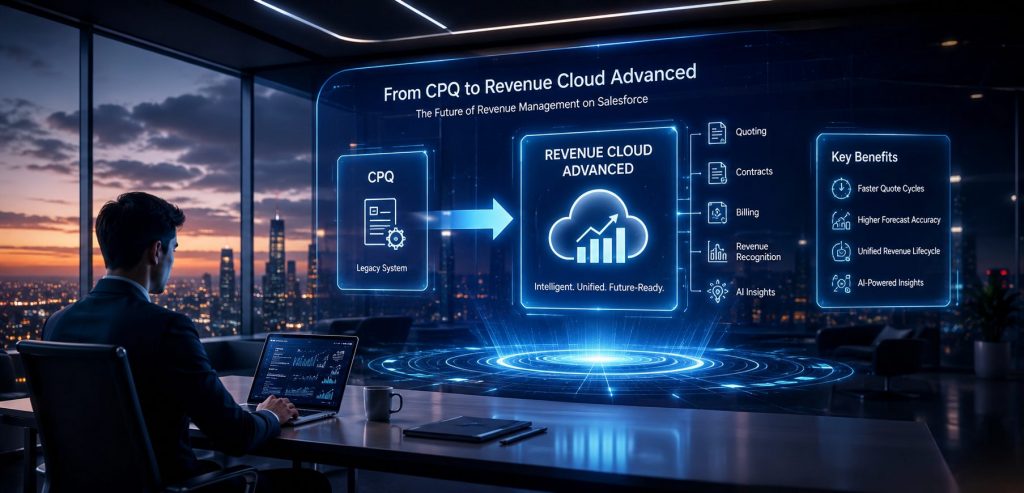
On March 19, 2025, Salesforce officially moved Salesforce CPQ to end of sale. Existing customers can keep running it and renewing licenses. New customers are directed to Revenue Cloud Advanced. Every dollar of Salesforce’s development investment goes into Revenue Cloud Advanced from here forward.
If you run CPQ today, your system keeps working. The more useful question is what the frozen roadmap, the widening platform gap, and the 2029–2030 end-of-life window mean for when you should plan to move, and what that move actually involves.
Two Different Timelines
End of sale (March 2025) means Salesforce stopped issuing CPQ licenses to new customers. Existing licenses renew as normal, and Salesforce continues providing basic support and security patches.
End of life is the later phase, projected around 2029–2030, based on how Salesforce has handled similar transitions. That is when all security updates officially stop. The gap between these two dates is where migration planning happens.
Four things change in your CPQ environment between now and the end of life:
- Feature freeze. Every Salesforce release from Spring 2025 onward adds capability to Revenue Cloud Advanced. The functional distance between the two platforms grows with each quarterly release.
- Talent shift. Salesforce developers and architects with CPQ expertise are moving to Revenue Cloud work because that is where new project budgets are. CPQ-skilled resources will become harder and more expensive to find over time.
- Integration drift. ERP vendors, billing platforms, and eSignature tools are aligning their roadmaps with Revenue Cloud. Each release cycle requires more custom maintenance to keep CPQ integrations functional.
- Reduced negotiating leverage. Implementation partners and Salesforce itself price migrations differently depending on how much planning time you have. Migrations scoped two years before a deadline cost significantly less than those triggered by deadline pressure.
What Revenue Cloud Advanced Actually Is
Revenue Cloud Advanced (also marketed as Agentforce Revenue Management after a 2025 rebrand) is an architectural rebuild of the entire quote-to-cash process on Salesforce’s native platform, the Einstein 1 core. It is API-first, metadata-driven, and connects directly to Data Cloud and the Agentforce AI layer.
CPQ was a managed package built on top of Salesforce, with its own object model, its own pricing engine, and performance limits that Salesforce stopped addressing after 2021. Revenue Cloud Advanced runs inside Salesforce rather than on top of it. There is no automated migration tool because the two systems use fundamentally different data architectures. Each piece of CPQ logic has to be evaluated and rebuilt in the new environment.
CPQ vs Revenue Cloud Advanced: Key Differences
| Factor | Salesforce CPQ | Revenue Cloud Advanced |
| Architecture | Managed package (SteelBrick-based), runs on top of Salesforce | Native Salesforce platform (Einstein 1 core), API-first |
| Scope | Configure, Price, Quote only | Quote + billing + contracts + renewals + revenue recognition |
| AI capabilities | Limited; requires custom builds | Built-in AI via Agentforce; native Data Cloud connection |
| Pricing models | One-time and basic subscription | Subscriptions, usage-based, hybrid, consumption billing |
| ERP integration | Custom connectors required | Native architecture simplifies ERP and billing system connections |
| New feature investment | None (maintenance mode since March 2025) | Active development; all Salesforce roadmap investment |
| Licensing (approx.) | Existing customers renew; no new sales | $150–200/user/month (Growth and Advanced tiers, billed annually) |
| Migration path | N/A | Full reimplementation required; no automated migration tool |
The scope difference is the most consequential factor for decision-making. CPQ handled configure, price, and quote. Revenue Cloud Advanced covers the entire revenue lifecycle in a single data model: quoting, contracts, billing, subscription management, renewals, and revenue recognition. Organizations that have completed the migration are reporting 30 to 40 percent faster quote cycles and a 30 percent improvement in forecast accuracy, though results depend heavily on how well the migration is planned and executed.
The Actual Scope of a CPQ to Revenue Cloud Migration
CPQ implementations accumulate customizations over time: pricing rules built for specific deals, custom Apex written to handle edge cases, integrations with ERP and billing systems that nobody fully documents. Mapping all of that before writing a line of Revenue Cloud configuration determines how accurately the project can be scoped and budgeted.
The correct framing for this type of project: a reimplementation of quote-to-cash logic on a different architecture. Every component needs individual evaluation before the build begins.
What gets rebuilt in Revenue Cloud
- Pricing logic. Price rules, discount schedules, contracted prices, and custom pricing calculations all need to be documented and rebuilt in Revenue Cloud’s Pricing Procedures engine. The logic itself transfers; the syntax and structure do not.
- Product catalog. Revenue Cloud’s attribute-based model lets you replace a 15-SKU catalog with one SKU and two attributes. That consolidation works only after you rationalize the catalog first. Pulling 24 months of quoting data and retiring products that have sold zero units in that period removes catalog debt before it becomes migration cost.
- Custom code. Quote Calculator Plugins, Apex triggers, custom Lightning components, and JavaScript pricing logic each require classification: rebuild in Revenue Cloud, retire entirely, or replace with native Revenue Cloud functionality. Knowing the count of custom components before scoping is what makes a project estimate defensible.
- Approval and amendment flows. The multi-stage approval logic governing discount thresholds, product combinations, and contract amendments usually lives in institutional memory. Getting it into written specs before the implementation partner opens a sandbox is what prevents scope creep mid-project.
- Integrations. Every connection to an ERP, billing system, payment gateway, eSignature tool, or CLM platform needs to be re-pointed at Revenue Cloud, with a different data shape on the receiving end in most cases. Running integration work as a parallel workstream rather than a final phase is the single most reliable way to prevent go-live delays.
Timeline and cost benchmarks
Mid-market Revenue Cloud migrations (20 to 150 users, moderate customization) typically run three to five months from kickoff to go-live. Enterprise projects with complex pricing logic, multiple product lines, or regional variation run nine to eighteen months.
Implementation costs for mid-market deployments range from $75,000 to $200,000, on top of licensing at $150 to $200 per user per month for Revenue Cloud Growth and Advanced tiers. Three to six months of pre-migration discovery and audit work typically precede the formal implementation contract.
A certified Salesforce consulting partner typically prices 20 to 40 percent below Salesforce Professional Services for equivalent scope and compresses timelines by 20 to 25 percent through pre-built migration playbooks.
Pre-Migration Audit: Six Areas to Map Before Kickoff
The strongest predictor of whether a migration finishes on time and on budget is the clarity of the pre-migration audit. Implementation partners who receive a full metadata map and dependency trace at the start of a project consistently deliver faster and with fewer production surprises than teams handed a verbal briefing.
- Customization inventory. A complete list of every Quote Calculator Plugin, custom trigger, custom button, and Lightning component gives the implementation team an accurate picture of the rebuild scope from day one.
- Pricing logic map. Document every price rule, what triggers it, and what it depends on downstream. Revenue Cloud’s pricing engine is more capable than CPQ’s and requires each rule to be rewritten in its syntax.
- Catalog rationalization. Pull 24 months of quoting activity. Products with zero quotes in that period are candidates for retirement. Migrating catalog debt adds implementation hours with zero business return.
- Dependency trace. For every important field, flow, and rule, map what feeds it upstream and what relies on it downstream. Documented dependencies surface as planned work items; undocumented ones surface as production incidents after go-live.
- Integration audit. List every system connected to CPQ, classify each by business criticality, and identify which connections require active rework versus simple reconfiguration in the new environment.
- Approval and renewal documentation. All business logic governing approval thresholds, contract amendments, and renewal terms should be captured in written specs before implementation begins. The more of this that gets written down during the audit, the less time gets spent reverse-engineering it during the build.
On timing: a 9 to 18-month enterprise migration means that teams wanting to complete the move before the 2029–2030 end-of-life window without time pressure should begin discovery in 2027 at the latest. For complex CPQ environments, starting the audit work in 2026 or early 2027 gives maximum control over scope and budget.
When to Move Sooner vs When to Take More Time
The right migration timeline depends on three factors: how complex the current CPQ implementation is, what the business’s revenue model looks like, and what Salesforce capabilities matter to the business in the next three to five years.
Standard implementations with limited custom Apex, a clean product catalog, and straightforward pricing rules carry lower risk in waiting through 2026 or into early 2027. The migration is still coming; more planning time produces a better outcome.
Heavily customized implementations, subscription or usage-based revenue models, and businesses that need Agentforce AI or Data Cloud integration for competitive reasons have a stronger case for moving earlier. Revenue Cloud Advanced already supports these capabilities natively. CPQ requires custom builds for all of them, and those builds require ongoing maintenance with a shrinking talent pool.
Third-party CPQ platforms are also worth evaluating before committing to a Revenue Cloud migration. Tools like Conga CPQ and Apttus serve specific pricing complexity profiles and may fit certain business models better than Revenue Cloud Advanced. For businesses that run primarily on Salesforce and plan to stay on the platform, Revenue Cloud Advanced removes integration complexity rather than layering it.
What Sarla Consulting Brings to a Revenue Cloud Migration
Sarla has been building and managing Salesforce implementations for over 20 years. On Revenue Cloud migrations, we run three parallel workstreams from the start: a structured pre-migration audit that produces a full metadata map, pricing logic documentation that captures business rules before any build work begins, and integration planning that runs alongside the configuration build rather than after it.
For businesses that have invested years in CPQ configuration, that institutional knowledge has real value. A well-planned migration carries that value forward into a platform with broader capability rather than leaving it behind in a rushed rebuild.
If you want to know where your CPQ environment stands on migration readiness, the right first step is an audit. Our Salesforce services team can assess your current environment and produce a realistic migration plan before you commit to a timeline or budget. You can also read more about our approach to custom Salesforce solution design, full-cycle implementation projects, and ongoing managed services that keep your org performing well after launch.
Organizations that start planning with enough runway get to choose their timeline, their partner, and their approach. That planning advantage compounds directly into lower cost and fewer surprises on the other side.
Ready to assess your CPQ environment? Talk to the Sarla Consulting team about where your implementation stands and what a Revenue Cloud migration would take for your business. Book a Free Consultation